Sharing State Between Vanilla and React Apps with Redux
The problem statement
I want to share a common data state between vanilla js and react app.
What is in this POC
- We will create two similar counter apps in vanilla and react.
- The count should be stored in a common state
- If we update the count in vanilla, it should be reflected in react and vice-verse
Project Structure
Our project is divided into two main sections:
- Root Directory: Contains core files for the vanilla JavaScript portion of the app.
react-mfDirectory: Houses the React micro-frontend which interacts with the vanilla JavaScript part.
The architecture of the app can be checked at link here
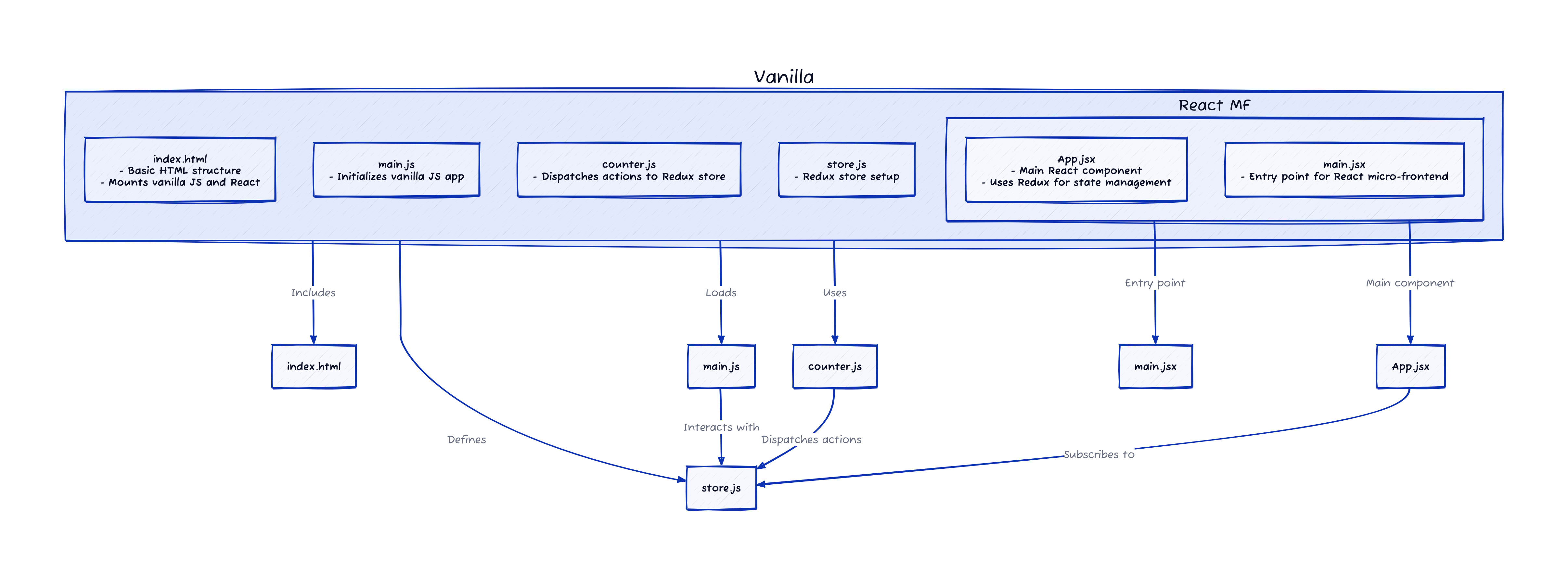
Key Files and Their Roles
Root Directory
-
index.html: This is the entry point of our app, setting up the HTML structure and including links to stylesheets and JavaScript files. It features two keydivelements withid="app"andid="root", which are used to mount the vanilla JS app and the React micro-frontend, respectively. -
main.js: Acts as the main JavaScript file for initializing the vanilla JS part of the app. It handles the core logic and interacts with the shared state. -
counter.js: Contains the code responsible for dispatching actions to the Redux store. For instance, it dispatches anINCREMENTaction to update the counter. -
store.js: Sets up the Redux store, which manages the application’s state and ensures consistency between the vanilla JS and React parts of the app.
react-mf Directory
-
App.jsx: The main React component of our micro-frontend. It utilizes theuseStatehook for local state management and subscribes to the Redux store to reflect the global state. It renders a button to dispatch anINCREMENTaction and displays the current count from the store. -
main.jsx: The entry point for the React micro-frontend, where the React app is initialized and rendered.
How does it work
- Create a basic vanilla js website using redux store.
- Expose the created store to
windowelement.
const store = createStore(reducer);
window.customStore = store- Make use of
store.dispatchfunction in react to fire a store action.
<button onClick={() => store.dispatch({type: 'INCREMENT'})}>- Listen to changes in store using
store.subscribe
store.subscribe(() => {
    setCount(store.getState().counter)
  })
You can find the full code in the GitHub repository.